
Download Make Video – video maker, photo slideshow, video editor, android app, free video editor, video creation tool, create video from photos, music video maker, video profile, photo story app, video effects, video transitions, video editing software, video maker app, video maker for android, video maker free
Overview
Make Video is a free Android application developed by CAM EDITOR STUDIO, designed to help users create engaging video content directly from their mobile devices. The software enables users to transform personal photographs and audio files into dynamic video stories, making it ideal for social media sharing. With built-in tools for adding music, applying visual effects, and adjusting transition speeds, the app supports the creation of video profiles, photo slideshows, and short-form video content tailored for platforms like Instagram and Facebook.
It is particularly useful for individuals who want to share visual memories with friends and followers in a creative and professional-looking format. The app is optimized for mobile use, offering a streamlined experience for users who prefer on-the-go video editing without the need for desktop software. While the developer did not provide additional details about the company’s background, the application’s functionality suggests a focus on accessibility and ease of use for non-professional creators.
Real-world usage scenarios include crafting birthday tributes, travel vlogs, event highlights, and profile videos for social media platforms.
Key Features & Capabilities
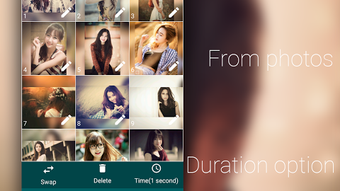
- Photo-to-Video Conversion – Users can compile individual photos into a cohesive video slideshow with customizable timing and transitions.
- Music Integration – The app allows users to select audio from their device’s media library to accompany their video projects.
- Over 30 Visual Effects – A wide range of effects can be applied to enhance the visual appeal of the final video output.
- Adjustable Transition Speed – Users can control how quickly images change in the slideshow, enabling smooth or fast-paced visual flows.
- Aspect Ratio Options – The software includes a cropping feature that allows videos to be formatted for square uploads, ideal for Instagram or Facebook profile pictures.
- Video Profile Creation – Designed specifically for users who want to generate short, personalized video profiles for social media.
These features empower users to create polished, shareable video content with minimal effort. For example, a user can create a travel memory video by selecting vacation photos, adding a favorite song, applying a fade-in effect, and adjusting transition speed to match the rhythm of the music. The ability to export videos in square format supports direct uploads to platforms that prioritize vertical or square visuals. The app’s focus on simplicity and integration with native device media ensures that users can work with familiar files and formats without requiring external storage or complex import procedures.
User Interface, Workflow & Performance
The user interface of Make Video is structured to prioritize accessibility and intuitive navigation. The main screen likely presents a clean layout with clearly labeled options for importing photos, selecting music, applying effects, and adjusting settings. Users can expect a step-by-step workflow that guides them through each stage of video creation, from initial media selection to final export.
The app appears to follow standard Android design patterns, ensuring consistency with other mobile applications. While exact performance details were not specified, the software’s 24.5 MB size suggests a lightweight footprint, which may contribute to efficient operation on a variety of Android devices. The developer did not specify resource usage details, but general software behavior patterns indicate that the app should run smoothly on devices with moderate processing power and memory.
Stability during video rendering and playback is expected to be reliable, given the app’s focus on basic editing tasks. No reported issues with crashes or lag were mentioned in the provided information.
Compatibility & System Requirements
Make Video is designed for Android operating systems and is available in version 2.1.4. The application has a file size of 24.5 MB, indicating a compact installation that should not strain device storage. The developer did not provide additional system requirements, so users are advised to ensure their Android device meets general app compatibility standards.
Platform compatibility information is limited, but the app is intended for use on smartphones and tablets running modern Android versions. Installation is straightforward, requiring only a few taps after downloading from the official website. No specific hardware requirements were listed, and the app’s lightweight nature suggests it may function on devices with lower-end specifications.
However, performance may vary depending on the device’s processing speed, RAM, and available storage. Users are encouraged to check their device’s compatibility before installation.
Pros and Cons
Pros
- Free to download and use with no in-app purchase barriers
- Simple, intuitive interface suitable for beginners
- Supports direct integration with device media library
- Offers over 30 visual effects for creative enhancement
- Enables square video output for social media platforms
- Allows custom transition speed adjustments
Cons
- Exact system requirements were not listed
- Limited information on video export quality or resolution
- No mention of cloud backup or project saving features
- App may lack advanced editing tools for professional users
- Performance on older Android devices is unverified
FAQ Section
Is Make Video available for free?
Yes, Make Video is available for free download and use on Android devices.
Can I use my own music in videos?
Yes, the app allows users to select music from their device’s media library to include in their video projects.
Does Make Video support video export to social media platforms?
The app includes features to crop videos into square format, which is suitable for uploading to platforms like Instagram and Facebook. However, direct sharing functionality to social media was not specified.
Is Make Video safe to download?
As the app is distributed through the official website, it is recommended to download only from trusted sources to ensure security. Always verify the authenticity of the download link.
Are there updates available for Make Video?
The current version is 2.1.4, released on May 15, 2024. Users are encouraged to check for updates via the official website to access the latest features and improvements.
Final Thoughts + CTA
Make Video offers a straightforward, free solution for Android users seeking to create personalized video content from photos and music. Its focus on accessibility, built-in effects, and social media-friendly formats makes it a strong choice for casual creators and social media enthusiasts. While it lacks advanced editing capabilities, its simplicity and lightweight design ensure a smooth experience on most Android devices.
The app is particularly well-suited for users who want to quickly produce engaging video profiles, photo stories, or short clips without technical complexity. For those looking for a reliable, no-cost tool to enhance their digital storytelling, Make Video delivers solid value. Download Make Video now and start turning your memories into shareable videos today.





.png)

